Introducción
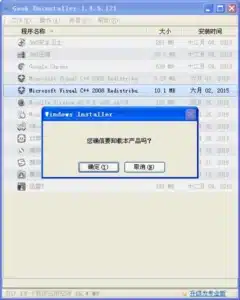
Geek Uninstaller 卸载工具 软件特点
1. 快速卸载:Geek Uninstaller能够快速识别和卸载应用程序,无需等待冗长的卸载过程。
2. 完全卸载:与操作系统自带的卸载工具不同,Geek Uninstaller能够执行彻底的卸载,包括清除相关文件、注册表项和其他残留文件。
3. 强大的过滤功能:Geek Uninstaller提供高级的过滤选项,可以根据应用程序的名称、大小、安装日期等进行搜索和排序,使用户能够轻松找到需要卸载的应用程序。
4. 批量卸载:Geek Uninstaller支持一次性卸载多个应用程序,大大减少了用户的工作量。
5. 移动应用卸载:Geek Uninstaller还具有卸载移动应用程序的功能,可以与Android设备连接,并轻松删除不需要的应用程序。
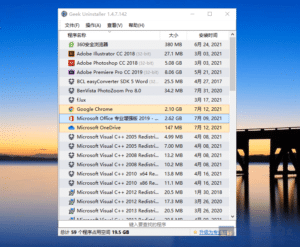
Geek Uninstaller 卸载工具 使用教程
1. 下载并安装Geek Uninstaller卸载工具。
2. 打开Geek Uninstaller,它将自动扫描已安装的应用程序。
3. 选择要卸载的应用程序。您可以单击“名称”、“大小”、“安装日期”等列标题,以排序应用程序列表。
4. 右键单击选择的应用程序,在弹出菜单中选择“卸载”选项。
5. Geek Uninstaller将开始执行卸载过程。在此过程中,您可以选择删除应用程序的相关文件和注册表项,以执行完全卸载。
6. 等待卸载过程完成,并按照需要选择删除残留文件和注册表项。
7. 完成卸载后,您可以关闭Geek Uninstaller。
Geek Uninstaller 卸载工具 注意事项
无
Enlace de descarga
Enlace:https://pan.baidu.com/s/1FnjP53gQBow2oEop3J9AdA?pwd=lskj
Código de descarga: lskj
Vía rápida:
Soy Lan Shan y me dedico a compartir: recursos escasos de Internet y herramientas tecnológicas innovadoras que aumentan la productividad.
35 herramientas imprescindibles para Windows – Blue Shirt Technology (bluelsqkj.com)
Blue Shirt Technology – Human: Fall Flat, versión sin Steam (bluelsqkj.com)
Blue Shirt Technology – Software PDF to X v7.0 + código de activación (bluelsqkj.com)